Message-first Android launcher that organizes and schedules conversations
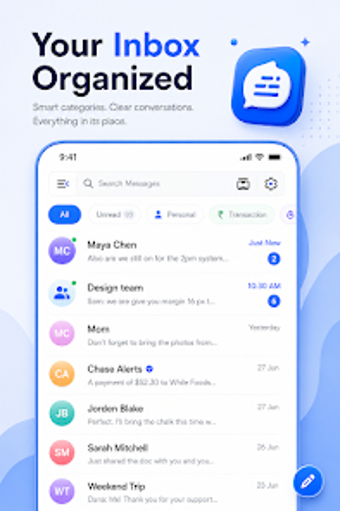
SMS Messages Texting Launcher by Appsoul Studio Inc is an Android app that centers your device on messaging. It acts as both an SMS/MMS client and a home-screen launcher, adds AI smart replies, message scheduling, spam protection, and automatic Smart Inbox categorization for OTPs and transactions. The app supports local backup and restore, customizable themes and notifications, one-swipe access from the launcher, and multimedia message support. It targets Android users with high volumes of automated alerts who want faster message handling.

Unlock your creativity with Adobe Stock
Get 10 images or 1 video with a free trial
How the app turns your home screen into a messaging hub
The app combines a launch surface and messaging interface so conversations are visually prominent rather than buried under apps. One-swipe access pulls recent threads onto the home screen and the Smart Inbox separates personal chats from automated items. That design reduces steps to reach a conversation, and the integrated layout is the central user experience rather than an add-on widget.
How private are your conversations with this app?
Privacy controls are concrete: the app includes a built-in spam blocker and contact blocking, and it offers local backup and restore for conversation history. The documentation does not claim transport-layer or end-to-end encryption, so privacy relies on device-side controls and the app's blocking features. Users who value on-device storage of messages have the explicit backup option.
Managing notifications without losing focus
Notification customization exists through adjustable sounds and visual themes, and the scheduling tool lets users compose messages ahead of time to avoid ad-hoc interruptions. The app's Smart Inbox also filters transactional traffic, which reduces noisy alerts by separating message types. The product notes do not enumerate per-channel notification rules, so fine-grained controls beyond basic customization are not documented.
How this app fits Android-only environments
This tool is Android-specific and requires being used on that platform; cross-device synchronization across other operating systems is not described. User feedback highlights quick performance and effective inbox decluttering, which aligns with the app's aim for communication-centric workflows on a single device. For users who want a messaging-first phone surface, the app's hybrid approach is the defining compatibility consideration.
A practical option for Android users prioritizing message-first workflows
SMS Messages Texting Launcher is a practical choice for Android users who need fast, inbox-centered access to conversations and clearer separation of automated messages. One consideration is the app's Android-only orientation and the requirement to adopt it as the primary messaging handler, which affects integration choices. It suits users who prefer fewer steps to reach chats and a home screen focused on communication.